Thursday, September 17, 2020

 We installed a Fusion Middleware report and Forms 12.2.1.2.0 on a Linux Server.

This was a single node Reports and Forms servers.
After disabling the Non SSL Listen Port, we get below error in logs while starting the Managed Server with only SSL ports enabled.

####<Oct 27, 2017, 2:38:23,265 PM CEST> <Info> <Deployer> <host01.example.com> <WLS_FORMS> <[ACTIVE] ExecuteThread: '1' for queue: 'weblogic.kernel.Default (self-tuning)'> <<WLS Kernel>> <> <728708fe-00a1-4078-bb31-f12fb2c6beae-00000030> <1509107903265> <[severity-value: 64] [rid: 0] [partition-id: 0] [partition-name: DOMAIN] > <BEA-149060> <Module dms.war of application DMS Application [Version=12.2.1.1.0] successfully transitioned from STATE_ACTIVE to STATE_ADMIN on server WLS_FORMS.>
####<Oct 27, 2017, 2:38:23,765 PM CEST> <Critical> <WebLogicServer> <host01.example.com> <WLS_FORMS> <main> <<WLS Kernel>> <> <728708fe-00a1-4078-bb31-f12fb2c6beae-00000031> <1509107903765> <[severity-value: 4] [rid: 0] [partition-id: 0] [partition-name: DOMAIN] > <BEA-000386> <Server subsystem failed. Reason: A MultiException has 4 exceptions. They are:
1. java.lang.AssertionError: No replication server channel for WLS_FORMS
2. java.lang.IllegalStateException: Unable to perform operation: post construct on weblogic.cluster.replication.ReplicationService
3. java.lang.IllegalArgumentException: While attempting to resolve the dependencies of weblogic.cluster.singleton.SingletonServicesBatchManager errors were found
4. java.lang.IllegalStateException: Unable to perform operation: resolve on weblogic.cluster.singleton.SingletonServicesBatchManager
 
A MultiException has 4 exceptions. They are:
1. java.lang.AssertionError: No replication server channel for WLS_FORMS
2. java.lang.IllegalStateException: Unable to perform operation: post construct on weblogic.cluster.replication.ReplicationService
3. java.lang.IllegalArgumentException: While attempting to resolve the dependencies of weblogic.cluster.singleton.SingletonServicesBatchManager errors were found
4. java.lang.IllegalStateException: Unable to perform operation: resolve on weblogic.cluster.singleton.SingletonServicesBatchManager
at org.jvnet.hk2.internal.Collector.throwIfErrors(Collector.java:89)
at org.jvnet.hk2.internal.ClazzCreator.resolveAllDependencies(ClazzCreator.java:249)
at org.jvnet.hk2.internal.ClazzCreator.create(ClazzCreator.java:357)
at org.jvnet.hk2.internal.SystemDescriptor.create(SystemDescriptor.java:471)
at org.glassfish.hk2.runlevel.internal.AsyncRunLevelContext.findOrCreate(AsyncRunLevelContext.java:232)
at org.glassfish.hk2.runlevel.RunLevelContext.findOrCreate(RunLevelContext.java:85)
at org.jvnet.hk2.internal.Utilities.createService(Utilities.java:2020)
at org.jvnet.hk2.internal.ServiceHandleImpl.getService(ServiceHandleImpl.java:114)
at org.jvnet.hk2.internal.ServiceHandleImpl.getService(ServiceHandleImpl.java:88)
at org.glassfish.hk2.runlevel.internal.CurrentTaskFuture$QueueRunner.oneJob(CurrentTaskFuture.java:1213)
at org.glassfish.hk2.runlevel.internal.CurrentTaskFuture$QueueRunner.run(CurrentTaskFuture.java:1144)
at weblogic.work.SelfTuningWorkManagerImpl$WorkAdapterImpl.run(SelfTuningWorkManagerImpl.java:666)
at weblogic.invocation.ComponentInvocationContextManager._runAs(ComponentInvocationContextManager.java:348)
at weblogic.invocation.ComponentInvocationContextManager.runAs(ComponentInvocationContextManager.java:333)
at weblogic.work.LivePartitionUtility.doRunWorkUnderContext(LivePartitionUtility.java:54)
at weblogic.work.PartitionUtility.runWorkUnderContext(PartitionUtility.java:41)
at weblogic.work.SelfTuningWorkManagerImpl.runWorkUnderContext(SelfTuningWorkManagerImpl.java:640)
at weblogic.work.ExecuteThread.execute(ExecuteThread.java:406)
at weblogic.work.ExecuteThread.run(ExecuteThread.java:346)
Caused By: java.lang.AssertionError: No replication server channel for WLS_FORMS
at weblogic.cluster.replication.ReplicationManagerServerRef.initialize(ReplicationManagerServerRef.java:128)
at weblogic.cluster.replication.ReplicationManagerServerRef.<clinit>(ReplicationManagerServerRef.java:84)
at java.lang.Class.forName0(Native Method)
at java.lang.Class.forName(Class.java:264)
at weblogic.rmi.internal.BasicRuntimeDescriptor.getServerReferenceClass(BasicRuntimeDescriptor.java:496)
at weblogic.rmi.internal.BasicRuntimeDescriptor.createServerReference(BasicRuntimeDescriptor.java:452)
at weblogic.rmi.internal.OIDManager.makeServerReference(OIDManager.java:193)
at weblogic.rmi.internal.OIDManager.getReplacement(OIDManager.java:173)
at weblogic.rmi.utils.io.RemoteObjectReplacer.replaceRemote(RemoteObjectReplacer.java:107)
at weblogic.rmi.utils.io.RemoteObjectReplacer.replaceObject(RemoteObjectReplacer.java:90)
at weblogic.rmi.extensions.server.ServerHelper.exportObject(ServerHelper.java:252)
at weblogic.cluster.replication.ReplicationServicesImplBase.exportSelf(ReplicationServicesImplBase.java:17)
at weblogic.cluster.replication.ReplicationManager.startService(ReplicationManager.java:305)
at weblogic.cluster.replication.ReplicationService.start(ReplicationService.java:46)
at weblogic.server.AbstractServerService.postConstruct(AbstractServerService.java:76)
at sun.reflect.GeneratedMethodAccessor2.invoke(Unknown Source)
at sun.reflect.DelegatingMethodAccessorImpl.invoke(DelegatingMethodAccessorImpl.java:43)
at java.lang.reflect.Method.invoke(Method.java:498)
at org.glassfish.hk2.utilities.reflection.ReflectionHelper.invoke(ReflectionHelper.java:1262)
at org.jvnet.hk2.internal.ClazzCreator.postConstructMe(ClazzCreator.java:332)
at org.jvnet.hk2.internal.ClazzCreator.create(ClazzCreator.java:374)
at org.jvnet.hk2.internal.SystemDescriptor.create(SystemDescriptor.java:471)
at org.glassfish.hk2.runlevel.internal.AsyncRunLevelContext.findOrCreate(AsyncRunLevelContext.java:232)
at org.glassfish.hk2.runlevel.RunLevelContext.findOrCreate(RunLevelContext.java:85)
at org.jvnet.hk2.internal.Utilities.createService(Utilities.java:2020)
at org.jvnet.hk2.internal.ServiceHandleImpl.getService(ServiceHandleImpl.java:114)
at org.jvnet.hk2.internal.ServiceLocatorImpl.getService(ServiceLocatorImpl.java:693)
at org.jvnet.hk2.internal.ThreeThirtyResolver.resolve(ThreeThirtyResolver.java:78)
at org.jvnet.hk2.internal.ClazzCreator.resolve(ClazzCreator.java:211)
at org.jvnet.hk2.internal.ClazzCreator.resolveAllDependencies(ClazzCreator.java:234)
at org.jvnet.hk2.internal.ClazzCreator.create(ClazzCreator.java:357)
at org.jvnet.hk2.internal.SystemDescriptor.create(SystemDescriptor.java:471)
at org.glassfish.hk2.runlevel.internal.AsyncRunLevelContext.findOrCreate(AsyncRunLevelContext.java:232)
at org.glassfish.hk2.runlevel.RunLevelContext.findOrCreate(RunLevelContext.java:85)
at org.jvnet.hk2.internal.Utilities.createService(Utilities.java:2020)
at org.jvnet.hk2.internal.ServiceHandleImpl.getService(ServiceHandleImpl.java:114)
at org.jvnet.hk2.internal.ServiceHandleImpl.getService(ServiceHandleImpl.java:88)
at org.glassfish.hk2.runlevel.internal.CurrentTaskFuture$QueueRunner.oneJob(CurrentTaskFuture.java:1213)
at org.glassfish.hk2.runlevel.internal.CurrentTaskFuture$QueueRunner.run(CurrentTaskFuture.java:1144)
at weblogic.work.SelfTuningWorkManagerImpl$WorkAdapterImpl.run(SelfTuningWorkManagerImpl.java:666)
at weblogic.invocation.ComponentInvocationContextManager._runAs(ComponentInvocationContextManager.java:348)
at weblogic.invocation.ComponentInvocationContextManager.runAs(ComponentInvocationContextManager.java:333)
at weblogic.work.LivePartitionUtility.doRunWorkUnderContext(LivePartitionUtility.java:54)
at weblogic.work.PartitionUtility.runWorkUnderContext(PartitionUtility.java:41)
at weblogic.work.SelfTuningWorkManagerImpl.runWorkUnderContext(SelfTuningWorkManagerImpl.java:640)
at weblogic.work.ExecuteThread.execute(ExecuteThread.java:406)
at weblogic.work.ExecuteThread.run(ExecuteThread.java:346)
>
####<Oct 27, 2017, 2:38:23,815 PM CEST> <Notice> <WebLogicServer> <host01.example.com> <WLS_FORMS> <main> <<WLS Kernel>> <> <728708fe-00a1-4078-bb31-f12fb2c6beae-00000031> <1509107903815> <[severity-value: 32] [rid: 0] [partition-id: 0] [partition-name: DOMAIN] > <BEA-000365> <Server state changed to FAILED.>

Even if no cluster is used, the default Reports and Forms domain configuration creates a WebLogic Cluster.

To solve “Servers do not have a common channel to communicate over” errors do the following steps as administrator

  1. Login into the Administration Console
  2. Expand the Environment tab and navigate to Clusters
  3. Select the and click ‘Replication’ subtab in the Configuration TAB
  4. Find Replication Channel, check box beside “Secure Replication Enabled” (to set it as true)
  5. Save
  6. Rerun the steps 2 to 5 for all clusters
  7. Activate the changes
  8. Restart the full WebLogic domain

or in WLST:
Start wlst.sh and connect to the WebLogic Domain

connect('user','password','t3s://host01.example.com:7002')
 
startEdit()
 
cd('/Clusters/cluster_forms')
cmo.setClusterType('none')
cmo.setPersistSessionsOnShutdown(false)
cmo.setReplicationChannel('ReplicationChannel')
cmo.setSecureReplicationEnabled(true)
 
save()
activate()

Rerun the same for the reports_cluster

Once done restart the full WebLogic Domain


https://blog.dbi-services.com/new-installed-fusion-middleware-12c-reports-or-forms-weblogic-servers-fails-to-start-after-configuring-ssl/

Tuesday, May 5, 2020

How to add minutes to date in excel sheet


if you want to add one minute to cell, use this formula:=A2+1/1440, if you want to add one second to cell, use this formula: =A2+1/86400.


How To Quickly Add Hours/Minutes/Second To Date And Time In Excel?

For instance, you have a list of dates and times in a worksheet, and now you want to add the same hours/minutes/seconds to these cells which are mixed with date and time. You can use formulas to solve this task, but here I can tell you another trick to quickly attain this goal in Excel.

 Using Formulas To Add Hours/Minutes/Seconds To Datetime

In Excel, generally, you may use the formulas to add hours, minutes or seconds to the datetime cells.
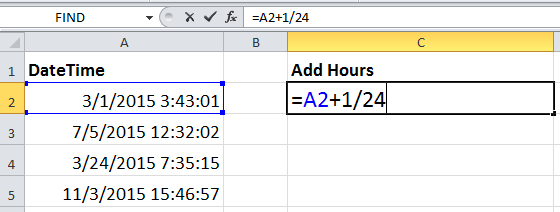
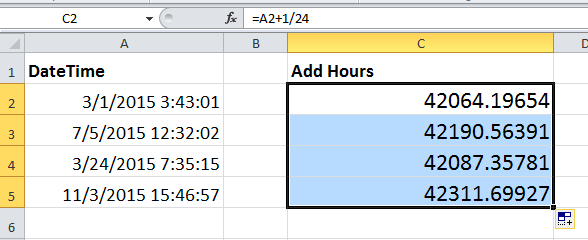
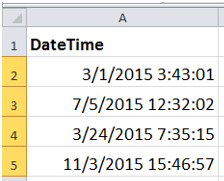
1. Select the cell next to the first cell of the datetime list, and then type this formula =A2+1/24 into it, press Enter key and drag the auto fill handle over the cell needed this formula. See screenshots.
doc add hour minute second 2
doc add hour minute second 3
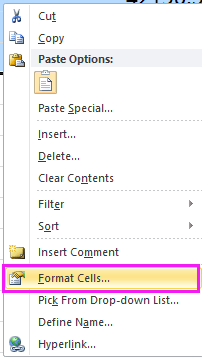
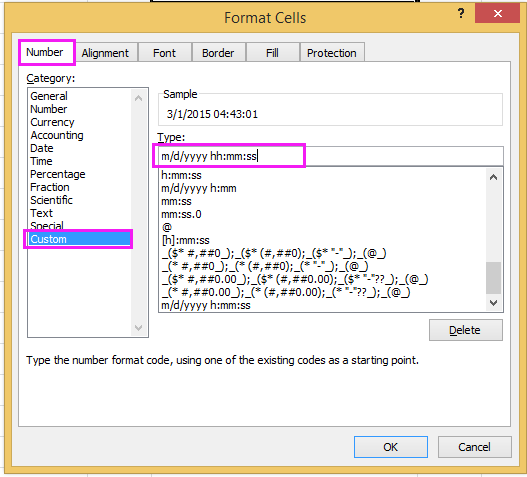
2. Then right click to select Format Cells from the context menu. And in the Format Cells dialog, under Number tab, select Custom from the Category list, then typem/d/yyyy hh:mm:ss into the Type textbox. See screenshots:
doc add hour minute second 4doc add hour minute second 5
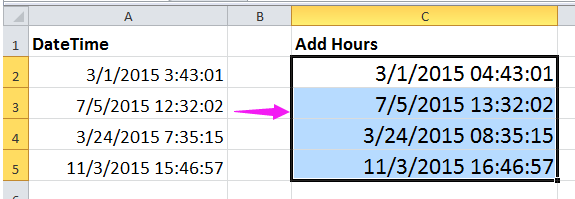
3. Click OK. Then you can see each date and time cell is added one hour.
doc add hour minute second 6
Notes:
1. If you want to add one minute to cell, use this formula:=A2+1/1440, if you want to add one second to cell, use this formula: =A2+1/86400.
2. In above formulas, 1 indicates to add one hour or one minute or one second, you can change it as you need.
3. If you want to add hours, minutes and second to a date simultaneously, you can use this formula =A2+TIME(23,23,34), this means to add 23 hours, 23 minutes and 34 seconds to a date cell. But with this formula, you cannot add time over 24 hours.

Easily Add Days/Years/Month/Hours/Minutes/Seconds To A Datetime In Excel

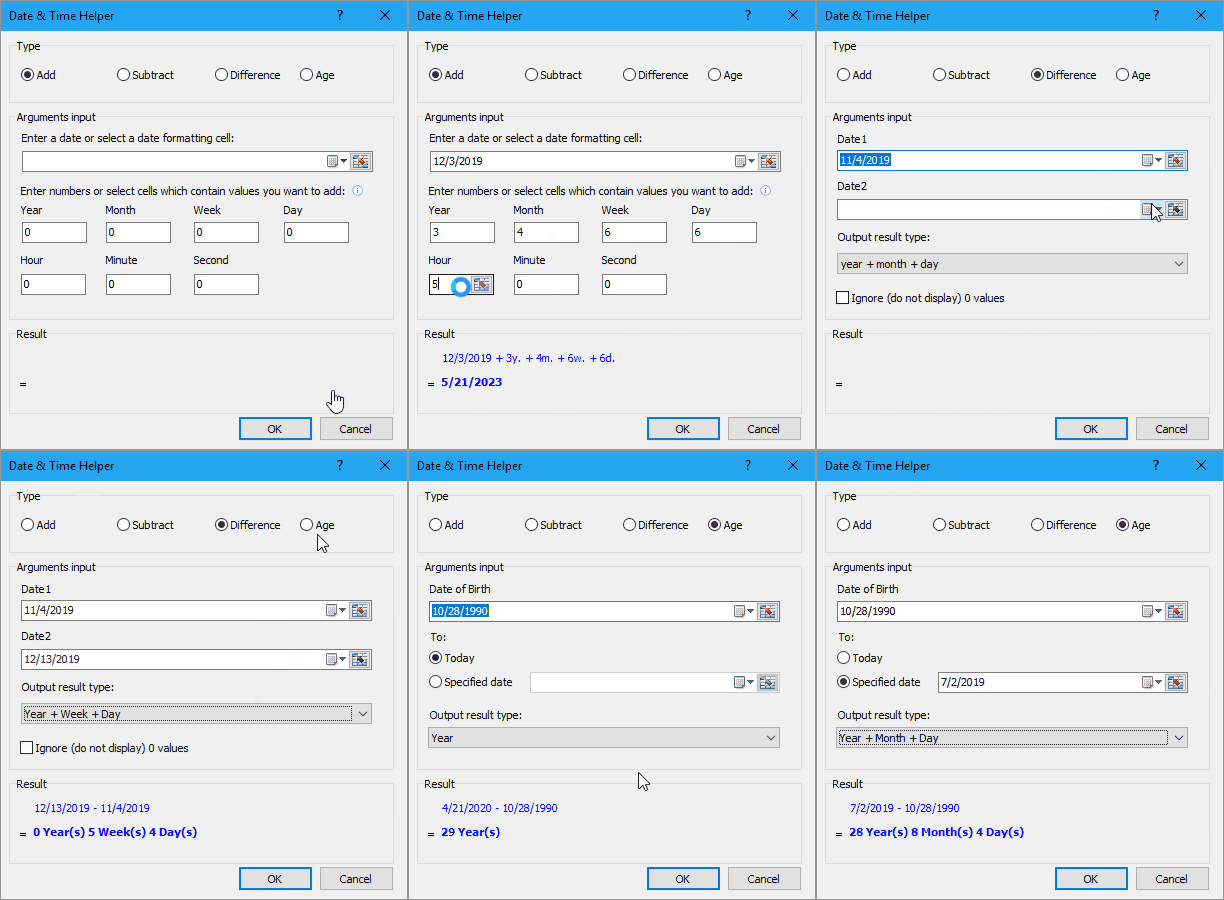
Supposing you have a date time format data in a cell, and now you need to add a number of days, years, months, hours, minutes, or seconds to this date. Normally, using formula is the first method for all Excel users, but it’s hard to remember all formulas. With Kutools for Excel’s Date & Time Helper utility, you can easily add days, years, months, or hours, minutes or seconds to a date time, moreover, you can caculate the date difference, or the age based on a given birthday without remembering the formula at all. Click for full-featured free trial in 30 days!
doc add hour minute second
 
Kutools for Excel: with more than 300 handy Excel add-ins, free to try with no limitation in 30 days.

 Using A Handy Tool To Add Hours/Minutes/Seconds To Datetime

With above method is very easy, but here I can introduce another easier way to you, do you want to have a try?
To free install Kutools for Excel, you can use the powerful utility -- Date & Time helper to add hours, minutes or seconds without remembering.
Kutools for Excel, with more than 300 handy functions, makes your jobs more easier. 
After installing Kutools for Excel, please do as below:(Free Download Kutools for Excel Now!)
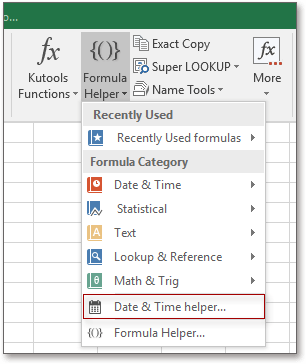
1. Select a cell to put the adding result, and click Kutools > Formula Helper > Date & Time helper. See screenshot:
doc add time 1
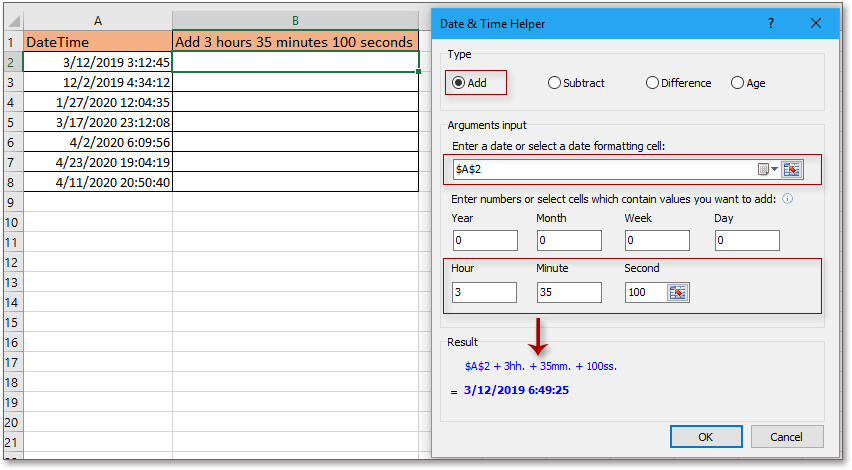
2. In the Date & Time Helper dialog, check Add option, click doc select button 1 to select a cell that you use to add time,  then type the number of hours, minutes and seconds you want to add in the Enter number or select cells which contain values you want to add section, you can preview the adding result in Result section See screenshot:
doc add hour minute second 8
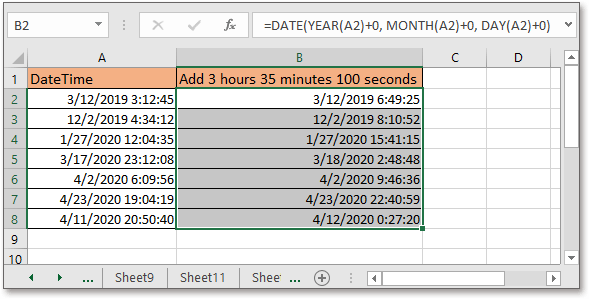
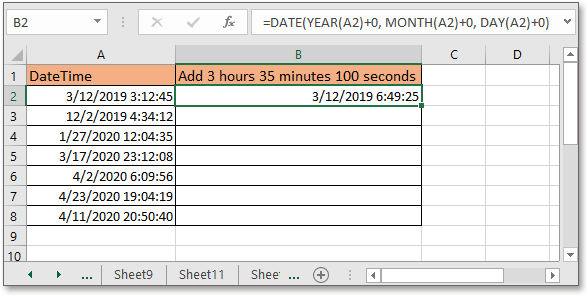
3. Click Ok, then drag the autofill handle over cells needed the formula, see screenshot:
doc add hour minute second 9
doc kutools date time helper 4


The Best Office Productivity Tools

Kutools For Excel Solves Most Of Your Problems, And Increases Your Productivity By 80%

  • Reuse: Quickly insert complex formulas, charts and anything that you have used before; Encrypt Cells with password; Create Mailing List and send emails...
  • Super Formula Bar (easily edit multiple lines of text and formula); Reading Layout (easily read and edit large numbers of cells); Paste to Filtered Range...
  • Merge Cells/Rows/Columns without losing Data; Split Cells Content; Combine Duplicate Rows/Columns... Prevent Duplicate Cells; Compare Ranges...
  • Select Duplicate or Unique Rows; Select Blank Rows (all cells are empty); Super Find and Fuzzy Find in Many Workbooks; Random Select...
  • Exact Copy Multiple Cells without changing formula reference; Auto Create References to Multiple Sheets; Insert Bullets, Check Boxes and more...
  • Extract Text, Add Text, Remove by Position, Remove Space; Create and Print Paging Subtotals; Convert Between Cells Content and Comments...
  • Super Filter (save and apply filter schemes to other sheets); Advanced Sort by month/week/day, frequency and more; Special Filter by bold, italic...
  • Combine Workbooks and WorkSheets; Merge Tables based on key columns; Split Data into Multiple SheetsBatch Convert xls, xlsx and PDF...
  • More than 300 powerful features. Supports Office/Excel 2007-2019 and 365. Supports all languages. Easy deploying in your enterprise or organization. Full features 30-day free trial. 60-day money back guarantee.
kte tab 201905

Office Tab Brings Tabbed Interface To Office, And Make Your Work Much Easier

  • Enable tabbed editing and reading in Word, Excel, PowerPoint, Publisher, Access, Visio and Project.
  • Open and create multiple documents in new tabs of the same window, rather than in new windows.
  • Increases your productivity by 50%, and reduces hundreds of mouse clicks for you every day!
officetab bottom

Tuesday, April 21, 2020

Retrieve Apps password in R12 or Forgot Apps Password in R12

Retrieve Apps password in R12 or Forgot Apps Password in R12


Steps to retrieve forgotten apps password in R12

Step 1 : login to DB-Node

sqlplus / as sysdba

STEP 2 : Create Function for to decrypt the encrypted password


SQL> create FUNCTION apps.decrypt_pin_func(in_chr_key IN VARCHAR2,in_chr_encrypted_pin IN VARCHAR2)
RETURN VARCHAR2
AS
LANGUAGE JAVA NAME 'oracle.apps.fnd.security.WebSessionManagerProc.decrypt(java.lang.String,java.lang.String) return java.lang.String';
/

Function created.

STEP 3 : (Query for password)


SQL> select ENCRYPTED_FOUNDATION_PASSWORD from apps.fnd_user where USER_NAME='GUEST';


Output

ENCRYPTED_FOUNDATION_PASSWORD
--------------------------------------------------------------------------------
ZG37E123746712BDB2D99E048FE44AE662F2713E2EDB443391BABA0414CADDB7A2E6DD45BBAFA7270A663E5EEBA837F5548A

STEP 4:

SELECT apps.decrypt_pin_func('GUEST/ORACLE','ZG37E123746712BDB2D99E048FE44AE662F2713E2EDB443391BABA0414CADDB7A2E6DD45BBAFA7270A663E5EEBA837F5548A') from dual;


Output

APPS.DECRYPT_PIN_FUNC('GUEST/ORACLE','ZG37E123746712BDB2D99E048FE44AE662F2713E2EDB443391BABA0414CADDB7A2E6DD45BBAFA7270A663E5EEBA837F5548A')
--------------------------------------------------------------------------------
DEMONSTRATE

STEP 5: (Test apps password)

SQL> conn apps/DEMONSTRATE;
Connected.

CHEERS :)

Monday, January 6, 2020

If the Admin Password of an EBS WebLogic Domain is lost or forgotten

As noted earlier, the EBS WebLogic domain uses Node Manager to control startup of the AdminServer and Managed Servers. For the EBS WebLogic domain, the Node Manager and WebLogic AdminServer passwords must be same. If the passwords are different, the AD control scripts will not work properly.
If the AdminServer password has been lost or forgotten, it can be reset by carrying out the following steps on the run file system. As described in the final step, an fs_clone operation should then be performed to synchronize the run and patch file systems.
  1. Shut down all running services. Since the AdminServer password is not known, the servers cannot be stopped from the console and so must be killed as follows.
    1. Connect to the Oracle E-Business Suite instance and source the application tier environment file.
    2. Identify the PIDs of Node Manager, AdminServer, and all running Managed Servers:
      $ ps -ef | grep "NodeManager"
      $ ps -ef | grep "weblogic.Name=AdminServer"
      $ ps -ef | grep "weblogic.Name=forms-c4ws_server"
      $ ps -ef | grep "weblogic.Name=forms_server"
      $ ps -ef | grep "weblogic.Name=oafm_server"
      $ ps -ef | grep "weblogic.Name=oacore_server"
    3. Kill all these processes, starting with Node Manager and followed by the Managed Servers.
  2. Back up these folders, and then delete them:
    <EBS_DOMAIN_HOME>/security/ DefaultAuthenticatorInit.ldift
    <EBS_DOMAIN_HOME>/servers/<server_name>/data/ldap
    <EBS_DOMAIN_HOME>/servers/<server_name>/security/boot.properties
    <EBS_DOMAIN_HOME>/servers/<server_name>/data/nodemanager/boot.properties
    
    
    Where:
    • <EBS_DOMAIN_HOME> is the absolute path of the EBS WebLogic domain
    • <server_name> is the name of the server directory under <EBS_DOMAIN_HOME>.
    If the password is not reset correctly, the backed up files and folders can be restored.
    Note: For certain servers, the boot.properties file may be present in only one location of the two specified above. In such a case, back it up and then delete it.
  3. Set up a new environment to change the WLS AdminServer password.
    1. Start a new session and connect to the Oracle E-Business Suite instance.
    2. Do not source the application tier environment file.
    3. Run the following command to source the WebLogic Server domain environment:
      $ cd <EBS_DOMAIN_HOME>/bin
      $ source setDomainEnv.sh
    4. Run the following commands:
      $ cd <EBS_DOMAIN_HOME>/security
      $ java weblogic.security.utils.AdminAccount <wls_adminuser> <wls_admin_new_password> .
      Where:
      • <wls_adminuser> is the same as the value of context variable s_wls_admin_user
      • <wls_admin_new_password> is the new WLS AdminServer password you wish to set.
      Note: Do not omit the trailing period ('.') in the above command: it is needed to specify the current domain directory.
  4. Start AdminServer from the command line. You will be prompted for the WebLogic Server username and password, so that the AdminServer boot.properties file can be generated.
    1. Go to the EBS Domain Home:
      $ cd <EBS_DOMAIN_HOME>
    2. Start AdminServer:
      $ java <s_nm_jvm_startup_properties> -Dweblogic.system.StoreBootIdentity=true -Dweblogic.Name=AdminServer weblogic.Server
      Where:
      • <s_nm_jvm_startup_properties> is the same as the value of context variable ss_nm_jvm_startup_properties
      The above command prompts for the WebLogic Server username and password:
      Enter username to boot WebLogic server:
      Enter password to boot WebLogic server: 
      Provide the same credentials as you provided in Step 3.
  5. Change the Node Manager password.
    1. Log in to the WebLogic Administration console.
    2. Click the 'Lock & Edit' button.
    3. In the left panel, click on the EBS Domain link.
    4. Select the 'Security' tab.
    5. Click on the 'Advanced' link.
    6. Edit the 'Node Manager password' field and set it to the new WebLogic Server password. The password should be same as set in Step 3.
    7. Edit the 'Confirm Node Manager Password' field and set it to the new WebLogic Server password. The password should be same as set in Step 3.
    8. Save and activate the changes.
  6. The first time, AdminServer has to be stopped from the Admin console. Follow these steps:
    1. Log in to the WebLogic Administration console.
    2. Shut down AdminServer.
  7. Set up your environment to start AdminServer again. AdminServer should now be started using the normal AD script, which will also start Node Manager using the new password.
    1. Launch a new session and connect to the Oracle E-Business Suite instance.
    2. Source the application tier environment file.
    3. Start AdminServer with the following command:
      $ $ADMIN_SCRIPTS_HOME/adadminsrvctl.sh start
  8. Start the Managed Servers. For the first time, all Managed Servers should be started from the WebLogic Server Admin console. This step will create boot.properties files for the respective Managed Servers. Follow these steps:
    1. Log in to the WebLogic Server Administration Console.
    2. Start all Managed Servers, one at a time.
  9. Shut down all the Managed Servers. This is so the new credentials will be picked up at the next startup. Follow these steps:
    1. Log in to the WebLogic AdminServer console.
    2. Shut down all Managed Servers.
    3. Shut down AdminServer.
  10. Shut down Node Manager using the normal AD script.
    $ $ADMIN_SCRIPTS_HOME/adnodemgrctl.sh stop
  11. Copy the boot.properties file for each Managed Server.
    WebLogic Server native scripts use the boot.properties file. The above steps have created the boot.properties file under <EBS_DOMAIN_HOME>/servers/<Managed Server name>/data/nodemanager, which is used by Node Manager. For each Managed Server, copy the newly-generated boot.properties file from<EBS_DOMAIN_HOME>/servers/<Managed Server name>/data/nodemanager to <EBS_DOMAIN_HOME>/servers/<Managed Server name>/security.
    The EBS WebLogic Server domain password has now been changed, and all servers can now be started using the normal AD scripts.
    To start AdminServer:
    $ADMIN_SCRIPTS_HOME/adadminsrvctl.sh start
    To start the Managed Servers:
    $ $ADMIN_SCRIPTS_HOME/admanagedsrvctl.sh start <managed_server_name>
  12. The above steps have changed the Oracle WebLogic AdminServer password on the run file system. You now need to perform an fs_clone operation, to change the WebLogic EBS Domain password on the patch file system:
    1. Launch a new session and connect to the Oracle E-Business Suite instance.
    2. Source the application tier environment file.
    3. Run the following command:
      $ adop phase=fs_clone

Thursday, January 2, 2020

Adding connection filter in EBS

cd $ADMIN_SCRIPTS_HOME
sh adadminsrvctl.sh start

-- add all nodes from run fs
--------------------------
. ~/EBSapps.env run
java -cp $CLASSPATH:$FMW_HOME/wlserver_10.3/server/lib/weblogic.jar oracle.apps.ad.tools.configuration.RegisterNodePreReq add-filter-rule \
-contextfile $CONTEXT_FILE -hostname <isupplier node hostname>


--------------------------

perl adpreclone.pl appsTier -- ## 25 minutes -- started 3.31pm

ewallet p12 vs cwallet sso

The  ewallet.p12  stores credentials and certificates protected by a user password, while  cwallet.sso  provides an obfuscated, random passw...