Friday, August 23, 2019

access.log analysis

access log

LOCATION :


$IAS_ORACLE_HOME/Apache/Apache/logs


SIGNIFICANCE :
An access log is a list of all the requests for individual files that people have requested from a Web site. These files will include the HTML files and their imbedded graphic images and any other associated files that get transmitted.


IMPORTANT POINTS :


>> We can modify setting in httpd.conf to rename the access log as below
---------------------------------------------------------------------------------------------------------------------
1- Stop the HTTP Server
2- Make a backup of $ORACLE_HOME/Apache/Apache/conf/httpd.conf:

3- Open the file httpd.conf and search for something like the following line:
...
CustomLog "|D:\oracle\FRM_REP_904\Apache\Apache\bin\rotatelogs.exe logs/access_log 43200" common
...
where ORACLE_HOME=D:\oracle\FRM_REP_904

4 - Modify the httpd.conf file like this example; this will create a new access_log every 24 hours
- 86400 seconds:
...
#
#CustomLog "|D:\oracle\FRM_REP_904\Apache\Apache\bin\rotatelogs.exe logs/access_log 43200" common
#
CustomLog "|D:\oracle\FRM_REP_904\Apache\Apache\bin\rotatelogs.exe logs/access_log.%d%m%Y 86400"
common
#
...

5 - Save the httpd.conf file

----------------------------------------------------------------------------------------------------------------------


FILE :

#########################################################################################################


132.226.187.252 - - [06/Jul/2010:20:00:17 -0400] "GET /OA_HTML/US/ICXINDEX.htm HTTP/1.0" 200 418 0

132.226.187.252 
This is the IP address of the client (remote host) which made the request to the server.The IP address reported here is not necessarily the address of the machine at which the user is sitting. If a proxy server exists between the user and the server, this address will be the address of the proxy, rather than the originating machine.

first -

The "hyphen" in the output indicates that the requested piece of information is not available. In this case, the information that is not available is the RFC 1413 identity of the client determined by identd on the clients machine.

second -

This is the userid of the person requesting the document as determined by HTTP authentication. If the document is not password protected, this part will be "-" just like the previous one.

[06/Jul/2010:20:00:17 -0400]

The time that the request was received. The format is:
[day/month/year:hour:minute:second zone]

"GET /OA_HTML/US/ICXINDEX.htm HTTP/1.0" 

The request line from the client is given in double quotes. The request line contains a great deal of useful information. First, the method used by the client is GET. Second, the client requested the resource ICXINDEX.htm and third, the client used the protocol HTTP/1.0.


200

This is the status code that the server sends back to the client. This information is very valuable, because it reveals whether the request resulted in a successful response (codes beginning in 2), a redirection (codes beginning in 3), an error caused by the client (codes beginning in 4), or an error in the server (codes beginning in 5). 

see the status code details below :
-------------------------------------------------------------------------
Informational 1xx

100 Continue
101 Switching Protocols

Successful 2xx
200 OK
201 Created
202 Accepted
203 Non-Authoritative Information
204 No Content
205 Reset Content
206 Partial Content

Redirection 3xx

300 Multiple Choices
301 Moved Permanently
302 Found
303 See Other
304 Not Modified
305 Use Proxy
306 (Unused)
307 Temporary Redirect
Client Error 4xx 

400 Bad Request
401 Unauthorized
402 Payment Required
403 Forbidden
404 Not Found
405 Method Not Allowed
407 Proxy Authentication Required
408 Request Timeout
409 Conflict
410 Gone
411 Length Required
412 Precondition Failed
413 Request Entity Too Large
414 Request-URI Too Long
415 Unsupported Media Type
416 Requested Range Not Satisfiable
417 Expectation Failed

Server Error 5xx 

500 Internal Server Error
501 Not Implemented
502 Bad Gateway
503 Service Unavailable
504 Gateway Timeout
505 HTTP Version Not Supported
-------------------------------------------------------------------------------

418

The last part indicates the size of the object returned to the client, not including the response headers. If no content was returned to the client, this value will be "-". 


132.226.187.253 - - [06/Jul/2010:20:00:29 -0400] "GET /OA_HTML/US/ICXINDEX.htm HTTP/1.0" 200 418 0
132.226.187.252 - - [06/Jul/2010:20:00:51 -0400] "GET /OA_HTML/US/ICXINDEX.htm HTTP/1.0" 200 418 0
132.226.187.253 - - [06/Jul/2010:20:01:02 -0400] "GET /OA_HTML/US/ICXINDEX.htm HTTP/1.0" 200 418 0
132.226.187.252 - - [06/Jul/2010:20:01:25 -0400] "GET /OA_HTML/US/ICXINDEX.htm HTTP/1.0" 200 418 0
132.226.187.253 - - [06/Jul/2010:20:01:36 -0400] "GET /OA_HTML/US/ICXINDEX.htm HTTP/1.0" 200 418 0
132.226.187.252 - - [06/Jul/2010:20:01:59 -0400] "GET /OA_HTML/US/ICXINDEX.htm HTTP/1.0" 200 418 0
132.226.187.253 - - [06/Jul/2010:20:02:10 -0400] "GET /OA_HTML/US/ICXINDEX.htm HTTP/1.0" 200 418 0
132.226.187.252 - - [06/Jul/2010:20:02:33 -0400] "GET /OA_HTML/US/ICXINDEX.htm HTTP/1.0" 200 418 0
132.226.187.253 - - [06/Jul/2010:20:02:44 -0400] "GET /OA_HTML/US/ICXINDEX.htm HTTP/1.0" 200 418 0
132.226.187.252 - - [06/Jul/2010:20:03:07 -0400] "GET /OA_HTML/US/ICXINDEX.htm HTTP/1.0" 200 418 0
132.226.187.253 - - [06/Jul/2010:20:03:19 -0400] "GET /OA_HTML/US/ICXINDEX.htm HTTP/1.0" 200 418 0
132.226.187.252 - - [06/Jul/2010:20:03:41 -0400] "GET /OA_HTML/US/ICXINDEX.htm HTTP/1.0" 200 418 0
132.226.187.253 - - [06/Jul/2010:20:03:53 -0400] "GET /OA_HTML/US/ICXINDEX.htm HTTP/1.0" 200 418 0
132.226.187.252 - - [06/Jul/2010:20:04:15 -0400] "GET /OA_HTML/US/ICXINDEX.htm HTTP/1.0" 200 418 0
132.226.187.253 - - [06/Jul/2010:20:04:26 -0400] "GET /OA_HTML/US/ICXINDEX.htm HTTP/1.0" 200 418 0
132.226.187.252 - - [06/Jul/2010:20:04:49 -0400] "GET /OA_HTML/US/ICXINDEX.htm HTTP/1.0" 200 418 0


147.154.160.171 - - [06/Jul/2010:23:24:12 -0400] "GET /OA_HTML/AppsLocalLogin.jsp HTTP/1.1" 200 6659 0

147.154.160.171 - - [06/Jul/2010:23:24:12 -0400] "GET /OA_HTML/cabo/styles/cache/oracle-desktop-2_2_24_3-en-ie-6-windows.css HTTP/1.1" 200 21976 0

147.154.160.171 - - [06/Jul/2010:23:24:13 -0400] "GET /OA_HTML/cabo/jsLibs/Common2_2_24_3.js HTTP/1.1" 200 92167 0

147.154.160.171 - - [06/Jul/2010:23:24:14 -0400] "GET /OA_HTML/cabo/images/t.htm HTTP/1.1" 200 28 0

147.154.160.171 - - [06/Jul/2010:23:24:14 -0400] "GET /OA_HTML/cabo/images/t.gif HTTP/1.1" 200 85 0
147.154.160.171 - - [06/Jul/2010:23:24:14 -0400] "GET /OA_MEDIA/FNDSSCORP.gif HTTP/1.1" 200 1435 0
147.154.160.171 - - [06/Jul/2010:23:24:14 -0400] "GET /OA_MEDIA/fndpbs.gif HTTP/1.1" 200 211 0
147.154.160.171 - - [06/Jul/2010:23:24:15 -0400] "GET /OA_HTML/cabo/images/cache/cghes-2.gif HTTP/1.1" 200 109 0

Monday, August 19, 2019

Useful Information about Workflow Background Process Concurrent Program

What is the purpose of Workflow Background Process

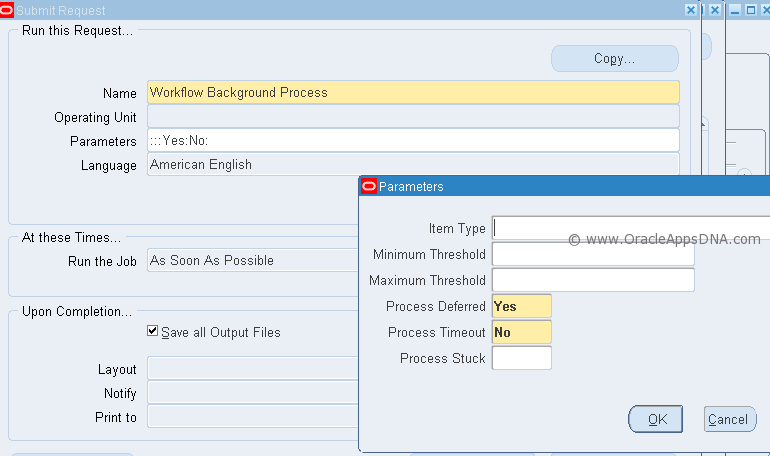
Workflow Background Process is a concurrent program which is run for processing deferred activities, timed out activities, and stuck processes using the parameters specified. The background engine executes all activities that satisfy the given arguments at the time that the background engine is invoked. This procedure does not remain running long term, so you must restart this procedure periodically. Any activities that are newly deferred or timed out or processes that become stuck after the current background engine starts are processed by the next background engine that is invoked.
Workflow Background Process is run with the help of Workflow Background Engine which is PL/SQL Procedure which runs this concurrent program with specified parameters.
Workflow Background Process Parameters:
  • Item Type – Specify an item type to restrict this engine to activities associated with that item type. If you do not specify an item type, the engine processes any activity regardless of its item type.
  • Minimum Threshold – Specify the minimum cost that an activity must have for this background engine to execute it, in hundredths of a second.
  • Maximum Threshold – Specify the maximum cost that an activity can have for this background engine to execute it, in hundredths of a second. By using Minimum Threshold and Maximum Threshold you can create multiple background engines to handle very specific types of activities. The default values for these arguments are null so that the background engine runs activities regardless of cost.
  • Process Deferred – Specify whether this background engine checks for deferred activities. Setting this parameter to Yes allows the engine to check for deferred activities.
  • Process Timeout – Specify whether this background engine checks for activities that have timed out. Setting this parameter to Yes allows the engine to check for timed out activities.
  • Process Stuck – Specify whether this background engine checks for stuck processes. Setting this parameter to Yes allows the engine to check for stuck processes.
 Note: Make sure you have a least one background engine that can check for timed out activities, one that can process deferred activities, and one that can handle stuck processes. At a minimum, you need to set up one background engine that can handle both timed out and deferred activities as well as stuck processes.

How to run Workflow Background Process from Oracle Applications?

1. Responsibility: System Administrator
2. Navigate: Requests > Run
3. Select Workflow Background Process from the list of values.
4. Enter parameters:
Item Type = OM Order Line
Process Deferred = yes
Process Timeout = yes
5. Submit concurrent program.

How to run Workflow Background Process from SQL*Plus?

BEGIN
  wf_engine.background (itemtype=>NULL ,
                        minthreshold=>NULL ,
                        maxthreshold=>NULL ,
                        process_deferred=>TRUE ,
                        process_timeout=>FALSE ,
                        process_stuck=>FALSE);
END;

How to run Workflow Background Process from Unix?

$ $FND_TOP/Admin/Sql/wfbkg.sql

Performance Tuning of Workflow Background Process

Workflow Background Process picks and executes all eligible workflow items related to Oracle Modules like OM,AP,PO,WSH,OKL,ASN,WIP, etc
Hence if ItemType parameter is not specified the workflow background process runs will first check for all eligible workflow activities and then run for all eligible workflows this will result in poor performance. It is preferable to execute the Workflow Background Process with specified ItemType.
References: Oracle Workflow Administrator Guide

Log files location in oracle apps 11i, R12.1 and R12.2

Log files location in oracle apps 11i:

Start/Stop script log files location:
$COMMON_TOP/admin/log/CONTEXT_NAME/

OPMN log file location:
$ORACLE_HOME/opmn/logs/ipm.log

Apache, Jserv, JVM log files locations:
$IAS_ORACLE_HOME/Apache/Apache/logs/ssl_engine_log
$IAS_ORACLE_HOME/Apache/Apache/logs/ssl_request_log
$IAS_ORACLE_HOME/Apache/Apache/logs/access_log
$IAS_ORACLE_HOME/Apache/Apache/logs/error_log
$IAS_ORACLE_HOME/Apache/JServ/logs

Concurrent log file location:
$APPL_TOP/admin/PROD/log or $APPLLOG/$APPLCSF

Patch log file location:
$APPL_TOP/admin/PROD/log

Worker Log file location:
$APPL_TOP/admin/PROD/log

AutoConfig log files location:
Application Tier:
$APPL_TOP/admin/SID_Hostname/log//DDMMTime/adconfig.log

Database Tier:
$ORACLE_HOME/appsutil/log/SID_Hostname/DDMMTime/adconfig.log

Error log file location:
Application Tier:
$APPL_TOP/admin/PROD/log

Database Tier :
$ORACLE_HOME/appsutil/log/SID_Hostname


In R12, the log files are located in $LOG_HOME (which translates to $INST_TOP/logs):

Concurrent logs location:
$LOG_HOME/appl/conc - > location for concurrent requests log and out files
$LOG_HOME/appl/admin - > location for mid tier startup scripts log files

Apache Logs (10.1.3 Oracle Home which is equivalent to iAS Oracle Home - Apache, OC4J and OPMN):
$LOG_HOME/ora/10.1.3/Apache - > Location for Apache Error and Access log files
$LOG_HOME/ora/10.1.3/j2ee - > location for j2ee related log files
$LOG_HOME/ora/10.1.3/opmn - > location for opmn related log files

Forms & Reports related logs (10.1.2 Oracle home which is equivalent to 806 Oracle Home)
$LOG_HOME/ora/10.1.2/forms
$LOG_HOME/ora/10.1.2/reports

Startup/Shutdown Log files location:
$INST_TOP/apps/$CONTEXT_NAME/logs/appl/admin/log

Patch log files location:
$APPL_TOP/admin/$SID/log/

Clone and AutoConfig log files location:
Database tier: 
RDBMS $ORACLE_HOME/appsutil/log/< context >/StageDBTier_< timestamp >.log

Application tier:
$INST_TOP/admin/log/StageAppsTier_< timestamp >.log

Where the logs for the admkappsutil.pl are located? 
$INST_TOP/admin/log/MakeAppsUtil_< timestamp >.log


Log files location in R12.2:

Log files of Online patching (adop) in EBS R12.2:

The adop log files are located on the non-editioned file system (fs_ne), under:
$NE_BASE/EBSapps/log/adop/<adop_session_id>/<phase>_<date>_<time>/<context_name>/log

This log directory will contain patch logs, patch lgi and patch worker logs.
adop(phase=fs_clone) Online pathcing filesystem cloning process related log files are found under:
$INST_TOP/admin/log

Autoconfig log files location:
Applicaion Tier:
$INST_TOP/admin/log/<MMDDhhmm>

Database Tier: 
$ORACLE_HOME/appsutil/log/<CONTEXT_NAME>/<MMDDhhmm>

Log files for start/stop of services from $ADMIN_SCRIPTS_HOME:
In below directory we will find log files related to start/stop process of oacore, forms, apache, opmn,
weblogic admin server/node manager:

$LOG_HOME/appl/admin/log

Log/Out files for Concurrent programs/managers location:
Log files: $APPLCSF/$APPLLOG (or $NE_BASE/inst/<CONTEXT_NAME>/logs/appl/conc/log)
Out files: $APPLCSF/$APPLOUT (or $NE_BASE/inst/<CONTEXT_NAME>/logs/appl/conc/out)

OPMN and OHS processes log file location:
Below directory contains log files related OPMN process(opmn.log),
OPMN Debug logs(debug.log), HTTP Transaction logs (access.log),security settings related logs.

$IAS_ORACLE_HOME/instances/<ohs_instance>/diagnostics/logs


Node Manager log file location in R12.2:
Log file is generated by Node Manager and contains data for all domains that
are controlled by Node Manager on a given physical machine.

$FMW_HOME/wlserver_10.3/common/nodemanager/nmHome1/nodemanager.log

Weblogic log files location:
Initial settings for AdminServer and Domain level information is written in this log file.

$EBS_DOMAIN_HOME/sysman/log

Log files for server processes initiated through Weblogic in Oracle R12.2.4 are in below location:
Stdout and stderr messages generated by the forms, oafm and oacore services are located
at NOTICE severity level or higher are written by Weblogic Node Manager to below directory.

$EBS_DOMAIN_HOME/servers/<server_name>/logs/<server_name>.out

Oracle Apps R12 Forms Not Opening

Oracle Apps R12 Forms Not Opening

The forms for Oracle Apps EBS may not open for many reasons. Follow below steps to find out:-

For a particular Form:-
  1. It displays some message which can help you finding out the cause.
  2. Most of the time its related to some database objects or the particular form executable.
    a. Compile all ( Mainly Apps owned ) db objects.
    b. Compile particular form executable.
For All forms:-
  1. Always check the DB, and alert log.
  2. Check file system space.
  3. Check Apache and Forms log. $LOG_HOME/10.1.3/Apache/Apache/logs and$LOG_HOME/10.1.2/forms/logs
  4. If you are using R12 with IE8 then check Metalink doc 1069497.1, for Cross Site Scripting(XSS) settings (make it to relevant tab of your internet options). Also check 389422.1 for recommended browsers and settings.
  5. Check timestamp for files like $AU_TOP/resource/CUSTOM.* , this will tell you if someone has modified the pll and then the changes should be reverted back.
  6. Try checking the form sessions from your server as below
    ps -ef | grep frm
    This will show the frmsrv and frmweb processes. If it doesn't then the issue is in spawning form session.
    You can check the timestamp for frmsrv/frmweb executable, if this has got changed. You can relink this by below.
    a. Source the Application environment
    b. from location $ORACLE_HOME/forms/lib
    run :- make -f ins_forms.mk install
  7. In other case if from sessions are there and you are not able to open the form, then check the direct form login as below.
    http://server:port/forms/frmservlet - for servlet mode
    http://server:port/OA_HTML/frmservlet - for socket mode
  8. If above works then you can go to adadmin and compile jsps, or can have clear cache bounce.
  9. If step 6 doesn't work then check for dbc file present at $FND_SECURE.
    a. The file should have correct entries for Application Server Id, as it is in FND_NODES table.
    b. All the passwords guest,applsyspub etc are ok, or change the guest password using FNDCPASS
    c. You can correct the dbc file manually, or regenerate using  $COMMON_TOP/admin/install/adgendbc.sh
  10. Bounce forms server and retry.

Friday, August 16, 2019

Concurrent request log and output display with delay

To add and delete a responsibilities to user from DataBase(Backend)

To add and delete a responsibilities to user from DataBase(Backend)

--API to add responsibilities to a user

BEGIN
  fnd_user_pkg.addresp(username =>'XXTEST',
                       resp_app =>'SYSADMIN',
                       resp_key =>'SYSTEM_ADMINISTRATOR',
                       security_group =>'STANDARD',
                       description => NULL,
                       start_date =>TO_DATE('01-JAN-2000'),
                       end_date =>NULL );
  COMMIT;
END;

/
(or)
/
declare
  l_user_name      VARCHAR2(100) := UPPER('XXTEST');
  l_resp_key       VARCHAR2(100) := 'SYSTEM_ADMINISTRATOR';
  l_app_short_name VARCHAR2(100);
BEGIN
  SELECT application_short_name
INTO l_app_short_name
FROM fnd_application fa,
  fnd_responsibility fr
WHERE fa.application_id = fr.application_id
AND TRUNC(sysdate) BETWEEN start_date AND NVL(end_date, '31-dec-4712')
AND fr.responsibility_key = l_resp_key;
fnd_user_resp_groups_api.load_row
                              (x_user_name           => l_user_name,
                               x_resp_key            => l_resp_key,
                               x_app_short_name      => l_app_short_name ,
                               x_security_group      => 'STANDARD',
                               x_owner               => 'CUST',
                               x_start_date          => TO_CHAR ( SYSDATE, 'YYYY/MM/DD'),
                               x_end_date            => NULL,
                               x_description         => NULL
                              );

commit;
end;
/
--API to remove responsibilities from that user

BEGIN
  fnd_user_pkg.delresp(username =>'XXTEST',
                       resp_app =>'SYSADMIN',
                       resp_key =>'SYSTEM_ADMINISTRATOR',
                       security_group =>'STANDARD' );
  COMMIT;
END;

Oracle E-Business Suite Software Development Kit for Java (includes AppsDataSource, Java Authentication and Authorization Service, session management) Readme - Patch 13882058 (Doc ID 974949.1)

Oracle E-Business Suite Software Development Kit for Java (includes AppsDataSource, Java Authentication and Authorization Service, session management) Readme - Patch 13882058 (Doc ID 974949.1)

ewallet p12 vs cwallet sso

The  ewallet.p12  stores credentials and certificates protected by a user password, while  cwallet.sso  provides an obfuscated, random passw...